 Fast Digital Product
A beginner friendly guide on Selling Pdfs to make money
Want to make money online, here's a beginner friendly guide on how to make money selling pdfs
A practical, beginner-friendly way to create and sell digital products, even if you have a full-time job.
If you've been trying to make money online, you've probably come across dozens of different business ideas.
Start a blog. Become a freelancer. Try affiliate marketing. Build a personal brand. Launch a YouTube channel.
And before you know it, you're spending more time researching business ideas than actually building one.
Here's what I think: Making money online doesn't have to be that complicated.
Especially if you already have a 9–5 job, responsibilities, and very little free time.
You don't necessarily need to learn an entirely new skill, become an influencer, or spend months building an audience before you can start.
In fact, there's a business model I'd encourage you to look into: selling digital products based on what you already know.
And with AI tools, getting your first product ready can be considerably faster than it used to be.
Let me show you how I'd approach this if I were starting from scratch.
1. Start With What You Already Know
Here's something people often overlook when trying to make money online:
You already have knowledge that someone else might be willing to pay for.
Think about it.
If you work a 9–5, there's a good chance you're developing skills, solving problems, and learning things that other people are still trying to figure out.
For example:
- Are you good at meal planning?
- Have you figured out how to manage your finances?
- Do you have experience with parenting?
- Are you particularly good at Excel?
- Do you work in email marketing?
- Have you developed an efficient system for managing projects?
These are all potential starting points for a digital product.
Let's say you work at an e-commerce company and your job involves email marketing.
You've learned how to write promotional emails, create welcome sequences, improve email engagement, and organize campaigns.
Someone who wants to learn email marketing might find that knowledge incredibly useful.
You could turn what you know into:
- An email marketing beginner's guide.
- A collection of ready-to-use email templates.
- A welcome email sequence swipe file.
- An email marketing checklist.
The goal isn't to create something complicated.
It's to package useful knowledge into something that helps another person achieve a specific result.
2. Use AI to Research and Build Your Product
Now that you have an idea, the next step is turning it into an actual product.
And this is where I'd introduce a tool called FastDigitalProduct.
You could use ChatGPT or Claude to create an ebook, but there's a difference between generating content and building a product that people actually want to buy.
You still need to research your audience, identify what they need, position your offer, write your sales copy, and create the actual product.
That's a lot of separate tasks.
FastDigitalProduct is designed to bring these steps together.
According to its workflow, the tool helps with:
- Researching your product idea.
- Identifying potential customer problems.
- Developing your product offer.
- Writing your sales page.
- Making your digital product.
Let's walk through how I'd use it.
Step 1: Enter your product idea
Once you're on the platform, select the new product option.

You'll be asked to describe what you want to create.
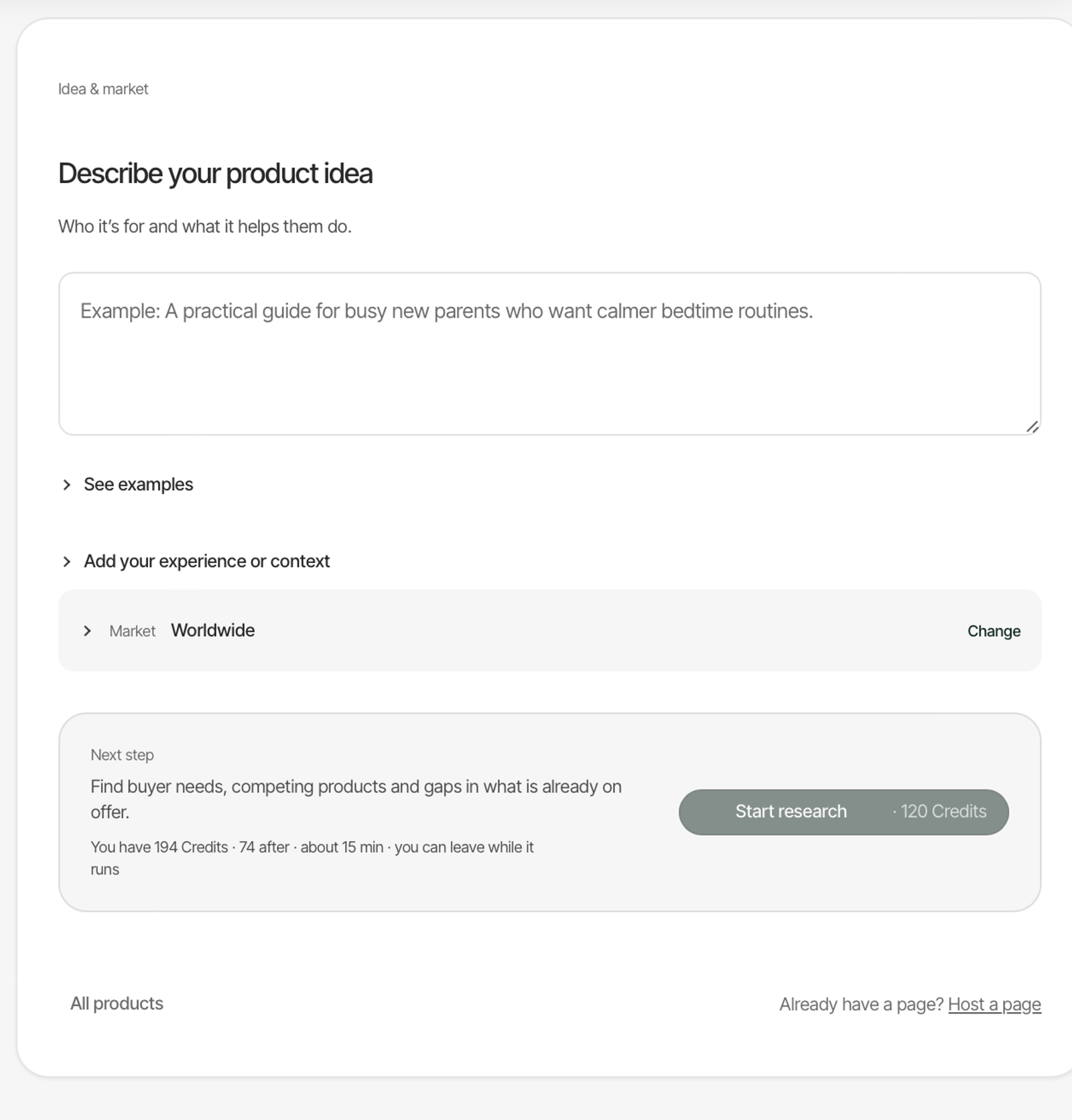
Don't overthink this part.
You could enter something as simple as:
- Beginner's knitting guide.
- Email marketing guide.
- Meal planning ebook.
- Personal budgeting workbook.
You don't need to have the entire product figured out yet.
That's what the research stage is for.
Step 2: Research your market
This is one of the most important parts of making a digital product.
You don't want to spend an entire weekend creating an ebook only to discover that nobody is particularly interested in buying it.
You need to understand your potential customers.
What problems are they struggling with? What questions are they asking? What solutions have they already tried?
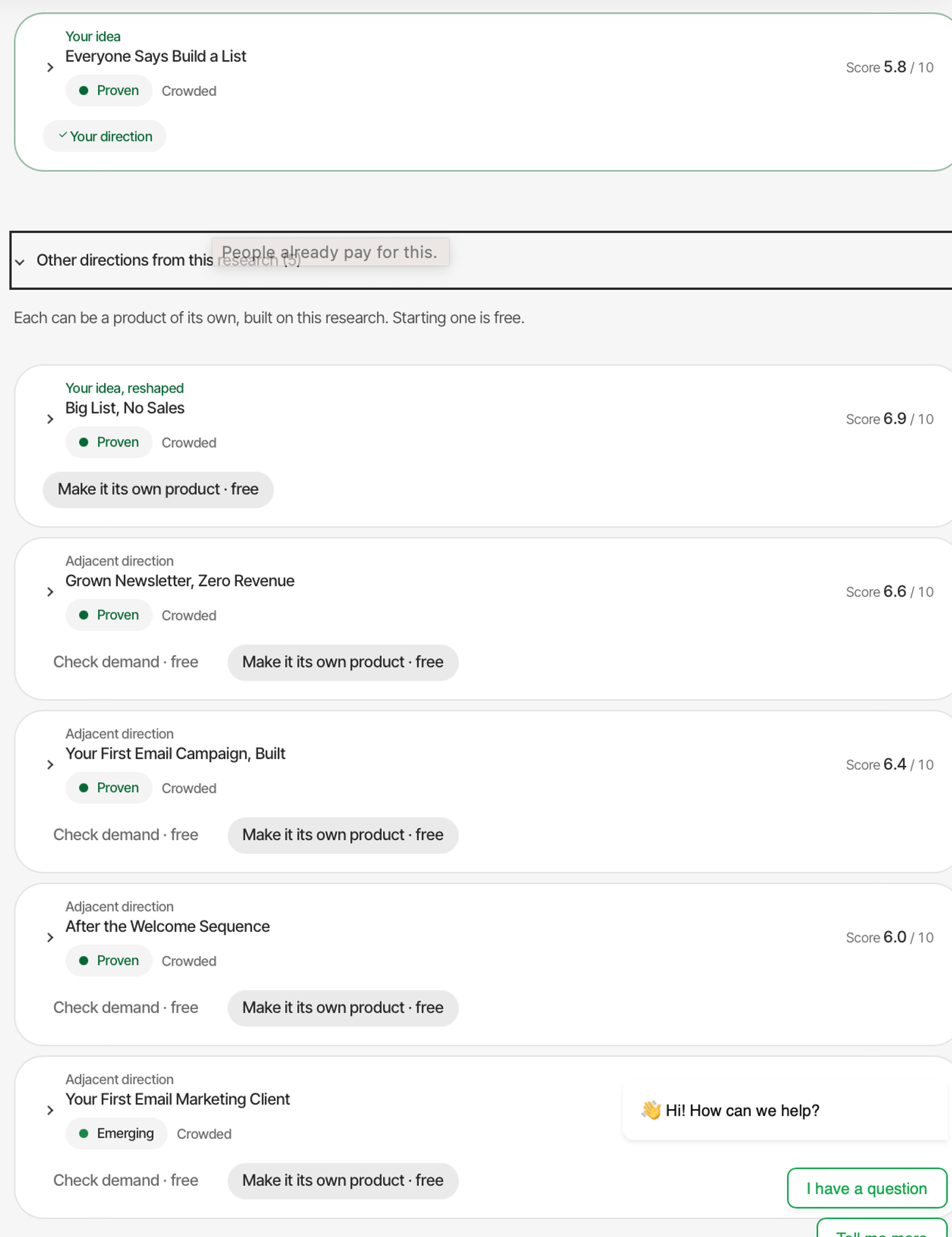
FastDigitalProduct uses sources such as Reddit, YouTube, TikTok, and the Facebook Ad Library to research your topic.
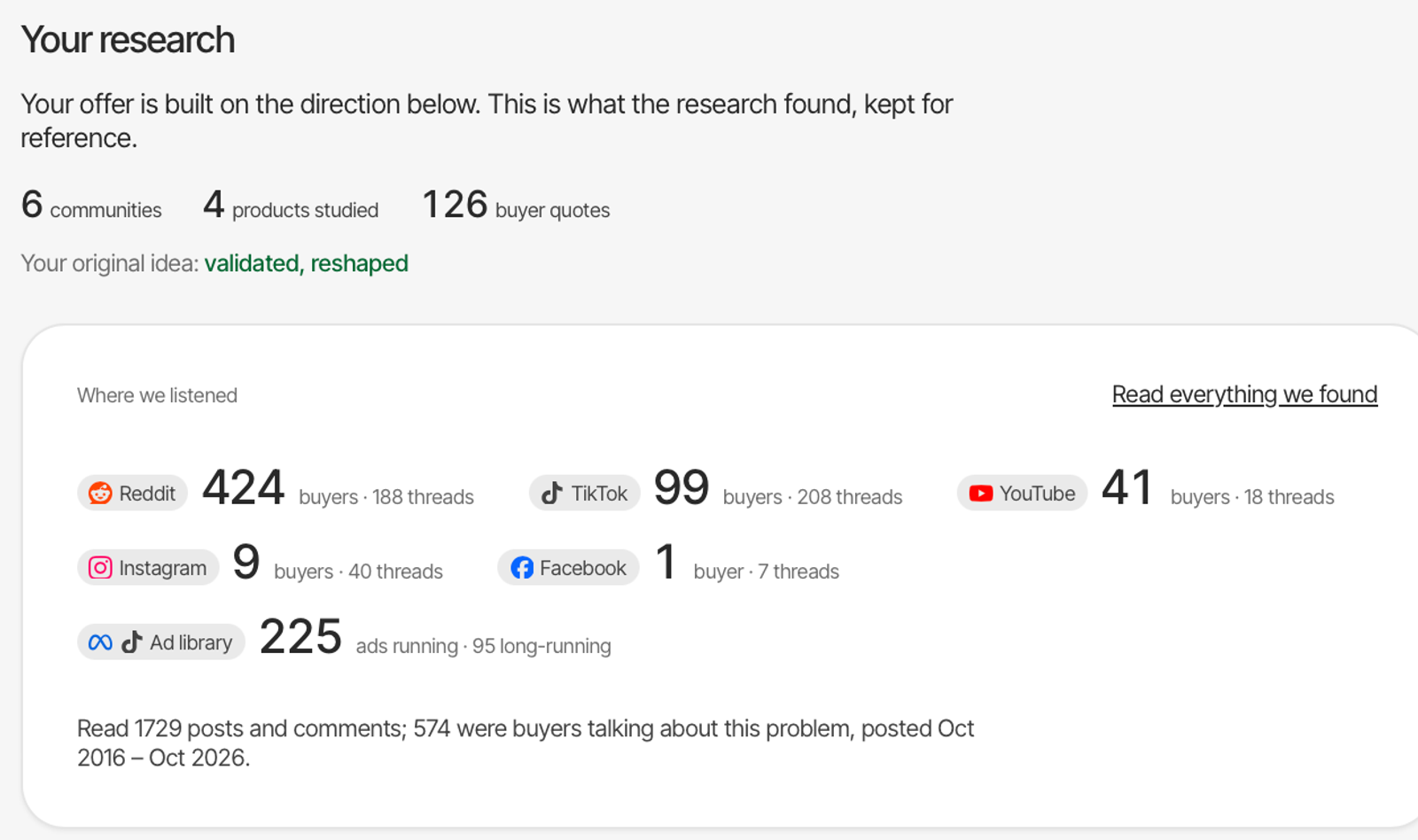
It then uses that research to generate different product directions.
This is useful because you aren't limited to creating a generic product around a broad topic.
For example, instead of making another general email marketing ebook, you might discover an opportunity to create a practical email marketing guide specifically for beginners running small online stores.
That's a much clearer product idea.
Choose the direction that best matches your knowledge and the audience you want to help.
Step 3: Build your offer
Having a product idea isn't enough.
You also need a compelling offer.
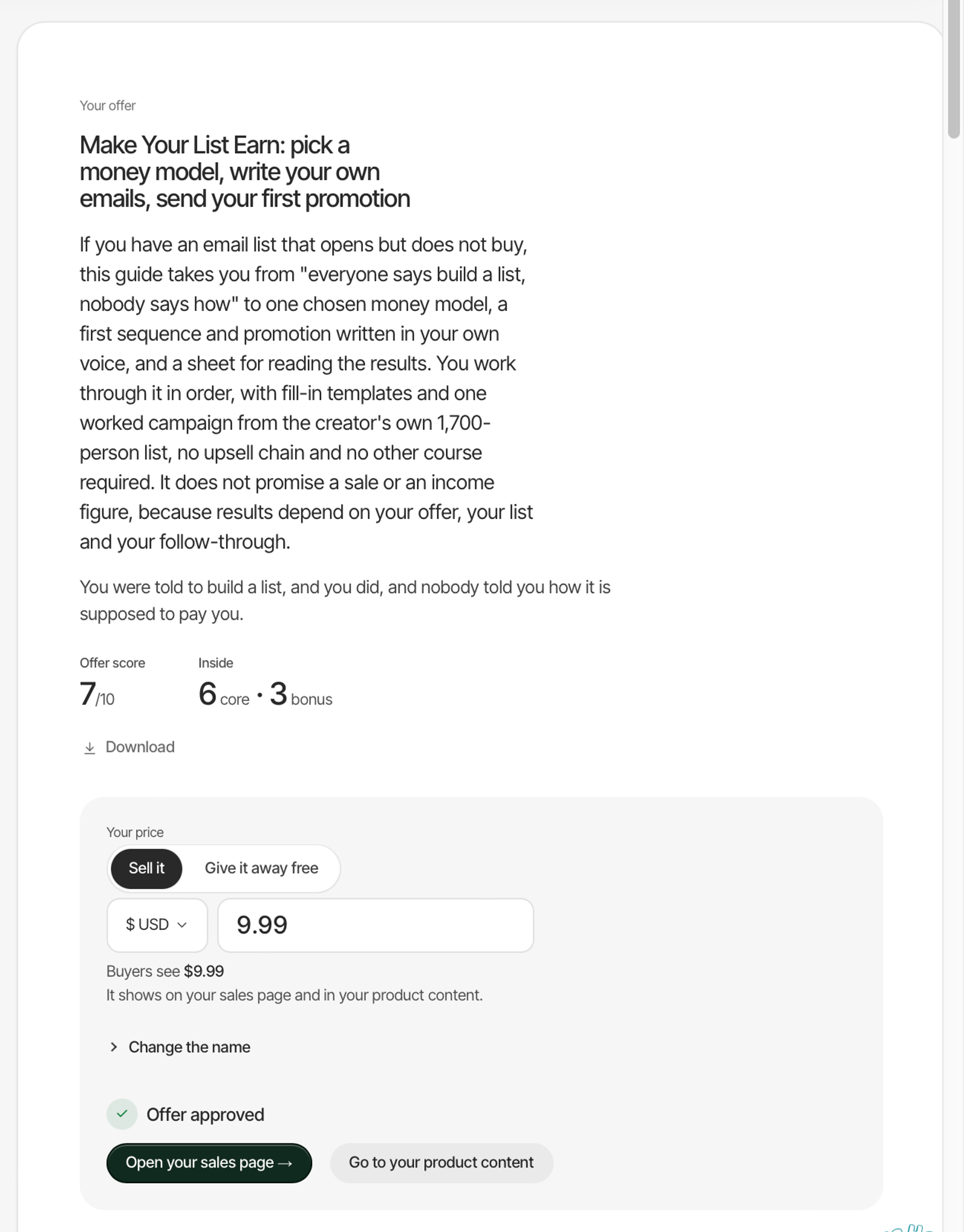
Your offer is essentially the promise you're making to your potential customer.
It answers an important question:
Why should someone spend money on this product?
For example, compare these two ideas:
- An ebook about email marketing.
- A beginner-friendly email marketing toolkit that helps small business owners write their first seven promotional emails.
The second one communicates a much clearer outcome.
It tells people what they're getting and why it might be useful.
This is the stage where you want to think about your product's positioning, the problem it solves, and the result someone can expect.
You can also decide whether you want to sell the product or give it away as a free resource.
Step 4: Create your sales page
Now you need somewhere to explain your product and convince people to buy it.
A good sales page should communicate:
- Who the product is for.
- What problem it solves.
- What's included.
- What makes it useful.
- How much it costs.
- How to get it.
FastDigitalProduct can help generate your sales copy, design your sales page, and create product page images.
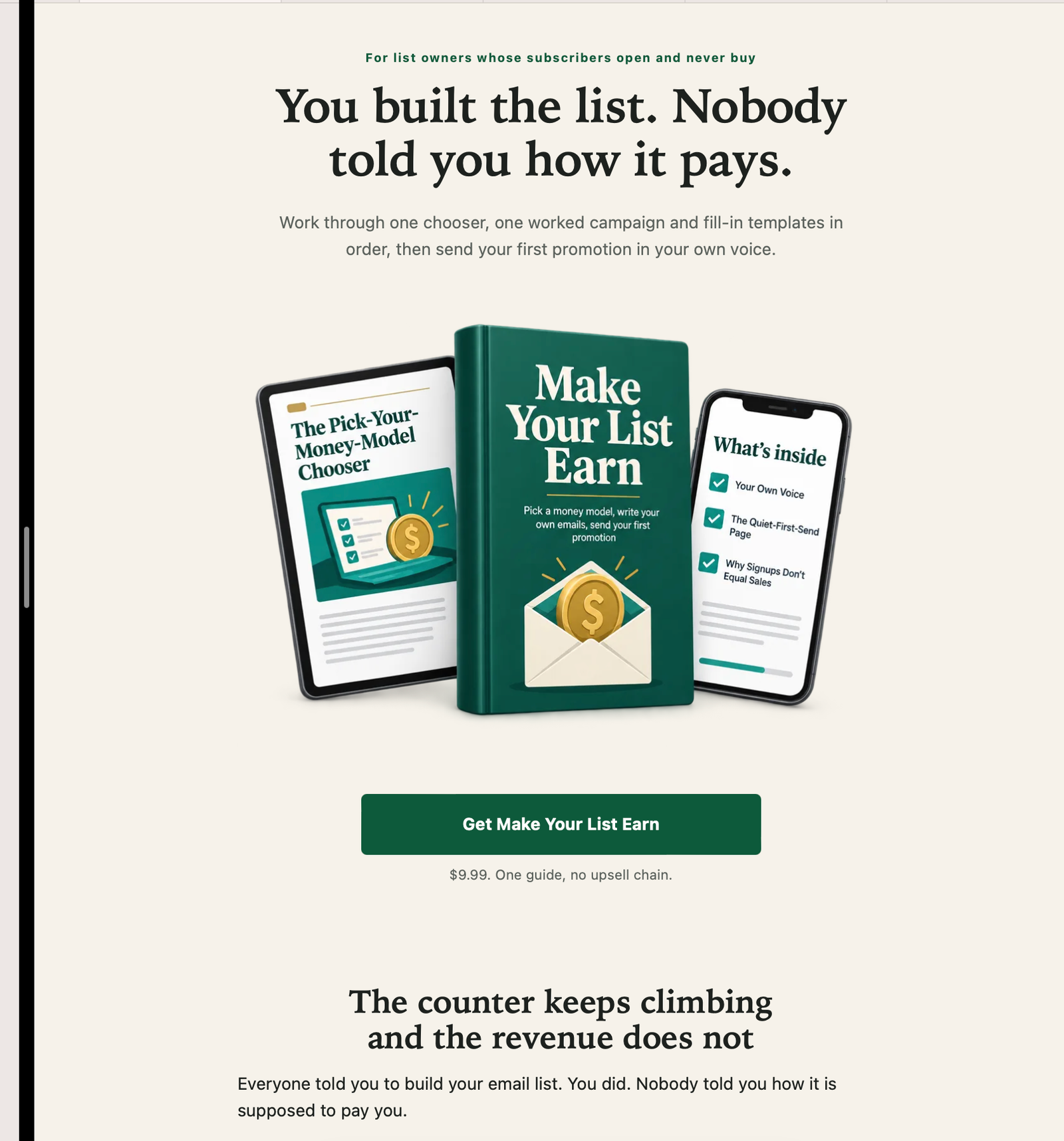
This saves you from having to build every part of your product presentation separately.
Of course, don't publish the first AI-generated version without reviewing it.
Make sure the claims are accurate, the benefits are clear, and the page actually sounds like something your target customer would respond to.
Step 5: Create your digital product
Finally, it's time to make the actual product.
This is where your research and offer come together.
For this example, let's say you're creating an ebook.
The tool generates the product content and handles elements such as formatting and images.
Here's what my generated product looked like.
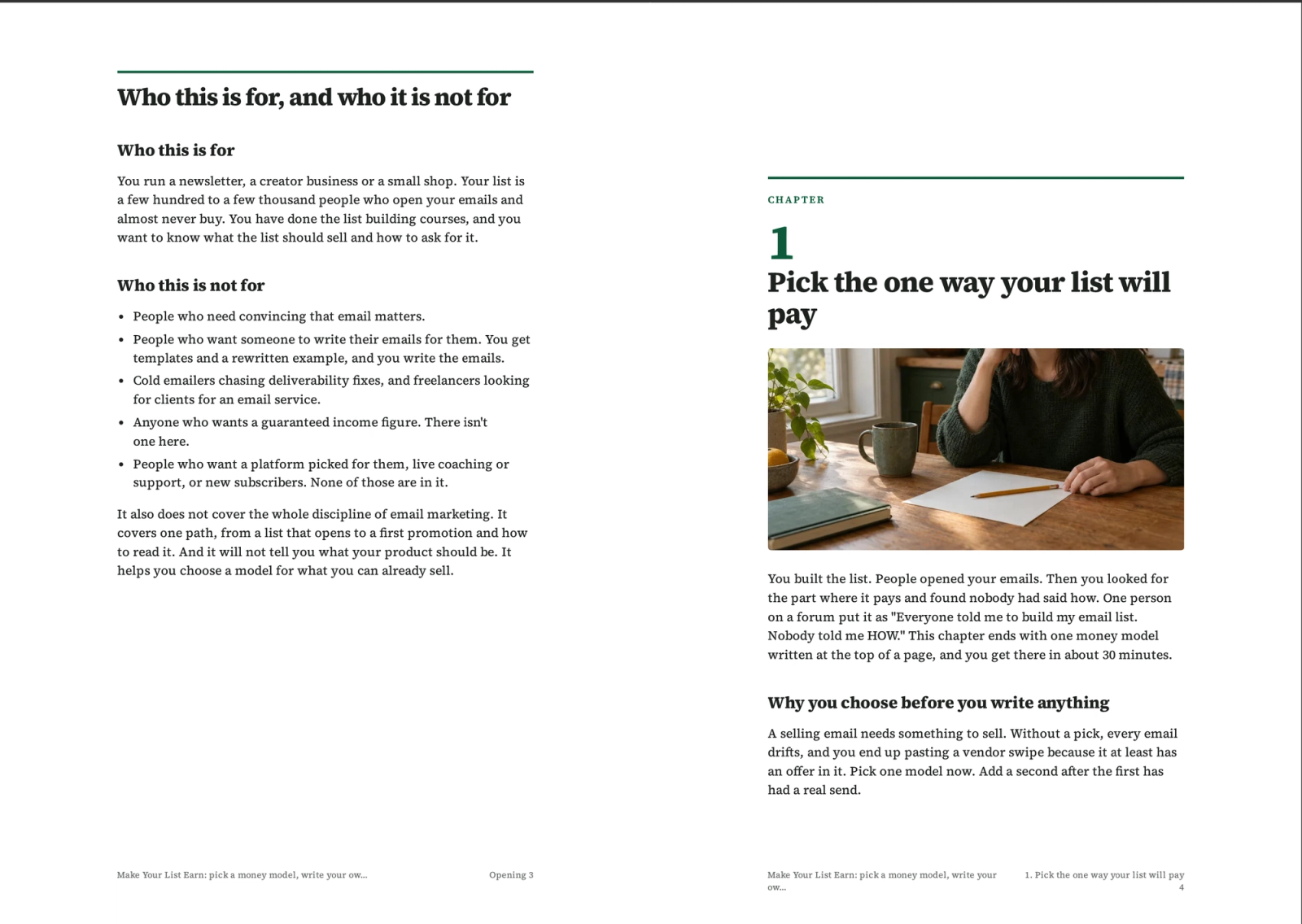
The important thing is that you now have a starting point instead of staring at a blank document wondering what to write.
You should still review the content, correct inaccuracies, improve the examples, and add your own knowledge and experience.
Remember, AI can help you create faster, but your job is to make sure the final product is genuinely useful.
3. How Do You Actually Make Money Selling Your Digital Product?
Now comes the part that matters most.
Creating a digital product is only half the business.
You need a way to get it in front of people who might actually want to buy it.
And this is where I'd focus on free marketing channels instead of immediately spending money on advertisements.
Here are six places I'd consider.
1. Amazon KDP
If your product is suitable for the platform, you can explore publishing it as an ebook or paperback through Amazon Kindle Direct Publishing.
Amazon already has people searching for books and guides.
The opportunity is to create something useful around a topic people are actively interested in.
Just make sure your product meets Amazon's publishing requirements.
2. Medium
This is one of my favourite marketing channels.
I've personally generated over 4,000 digital product sales using Medium as part of my marketing strategy.
The idea is simple.
Write helpful articles around problems your digital product solves.
For example, if you're selling an email marketing guide, you could write articles about:
- How to write your first marketing email.
- Email marketing mistakes beginners should avoid.
- How to create an email welcome sequence.
- How small businesses can use email marketing.
Then naturally introduce your digital product as a resource for readers who want a more complete solution.
You're not just publishing random articles.
You're creating content that attracts people who are already interested in what you're selling.
3. Pinterest
Pinterest is another platform I'd consider, particularly if you're selling ebooks, planners, templates, and other visually appealing digital products.
Create pins around keywords your potential customers are searching for.
For example, someone selling a budgeting planner could create pins targeting:
- Monthly budget planner.
- How to save money on a low income.
- Beginner budgeting tips.
- Printable financial planner.
Each pin should lead somewhere useful, such as your blog, a free resource, or your product page.
Pinterest is a longer-term traffic strategy. Give yourself several months to test keywords, designs, and landing pages rather than expecting instant sales.
4. TikTok
You don't necessarily need to become a full-time content creator.
Start by creating simple educational carousels and short videos around your product's topic.
For example, if you're selling a meal planning ebook, you could share:
- Five mistakes people make when planning meals.
- How to plan a week's meals in 15 minutes.
- Three ways to reduce food waste.
- A simple weekly meal planning system.
Your content should give people a reason to follow you and discover your product.
You can also explore TikTok LIVE eligibility and product demonstrations as your account grows.
5. YouTube
YouTube is another channel worth exploring if you're comfortable creating educational content.
You don't even need to start with complicated videos.
Screen recordings, tutorials, presentations, and simple talking-head videos can all work.
I once generated 26 digital product sales in two days using YouTube alongside a waitlist.
The strategy is to create videos that answer questions your potential customers are already asking.
For example:
- How to Create a Monthly Budget.
- How to Start Email Marketing as a Beginner.
- How to Create Your First Digital Product.
Then introduce your digital product as the next step for viewers who want to implement what you've taught.
6. Threads
Finally, there's Threads.
I'd use this platform to share short educational posts, opinions, practical tips, and longer threads around the problem my product solves.
You can also use Threads to build an email list.
For example, offer a free checklist or mini-guide related to your paid product.
People who download your free resource can join your email list, where you can continue providing value and introduce your paid offer.
The goal is to build an audience of people who are actually interested in your topic, not just collect random followers.
4. Why I Like This Business Model
Here's what makes this approach interesting to me.
Your biggest investment isn't necessarily money.
It's the knowledge, skills, and experience you already have.
You don't need to manufacture physical products, manage inventory, or spend your weekends packaging orders.
You can create a digital product, put it online, and build a marketing system around it.
And with AI tools helping you handle research, product development, and sales page creation, you can reduce some of the time-consuming work involved.
That doesn't mean creating a product guarantees sales.
You still need to understand your audience, make something worth buying, and consistently market it.
But you don't have to make the process unnecessarily complicated.
Start with what you know. Turn it into something useful. Get it in front of people who need it.
That's the business model I'd encourage a beginner to explore.
If you'd like to try the workflow I demonstrated, you can check out FastDigitalProduct here.
You don't need to have everything figured out before you start. You just need a useful idea and a willingness to build on it.
Back to all articles